- Date: Oct 30, 2026
- Read time: 5 minutes

Know Who Touched Your AI Data, and Whether It Can Still Be Trusted
Every AI data incident eventually comes down to one question: who touched this data, from which workload, and can it still be trusted?
For most organizations running AI on Kubernetes, that question is surprisingly hard to answer. Access controls and encryption decide who is allowed to reach data. They don’t tell you who actually did, or whether the training set your next model depends on is still what you think it is.
Today we’re making that answer available. Superna Data Security for Dell AI Infrastructure is now available through Dell, giving organizations running AI workloads on Kubernetes that access data on Dell PowerScale or Dell ObjectScale a way to trace every piece of AI data back to the person and workload behind it, and to see whether that data can still be trusted.
Kubernetes Broke the Old Security Model
Traditional data security assumed a fixed user on a fixed host. AI workloads don’t work that way. As GenAI and agentic applications move from pilot to production, they run as Kubernetes jobs that spin up, mount training or retrieval data through Persistent Volume Claims and object buckets, read regulated or sensitive data, and disappear before anyone reviews what happened.
Kubernetes doesn’t provide data-level audit logs. Storage audit shows a service account, not the person behind the workload. And when a scheduler or controller creates the pod, the human who launched the work is hidden one more layer down.
The result is four blind spots in nearly every AI environment:
- Provenance: Where did the data in a training or RAG environment come from, and who put it there?
- Access: Who or what actually touched the data used by AI?
- Manipulation: Was AI data altered, deleted, replaced, or poisoned?
- Exfiltration: Was high-value AI data copied, read at unusual scale, or moved out?
What Superna Data Security for Dell AI Infrastructure Does
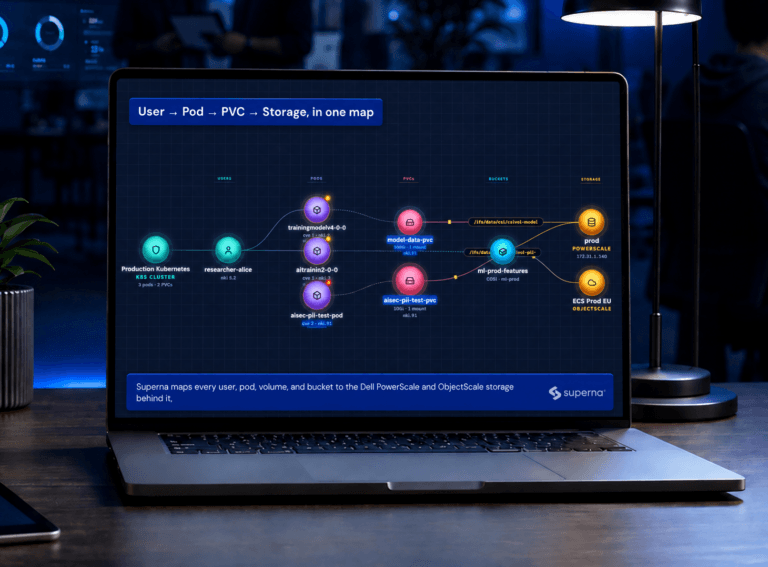
Superna connects users, workloads, storage, and queries into one identity lineage, User → Pod → Host → Data, and reads the data itself for sensitive content and integrity loss. It works in four ways.
See. A live map of every user, pod, PVC, bucket, and storage volume in your AI pipeline, with sensitive-data context overlaid. Rewind the map to see what existed and what was connected at any point.
Attribute. Every Dell PowerScale and Dell ObjectScale event is resolved to the pod, the job, and the person behind it, even after the pod or PVC has been deleted. Superna identifies the Pod Creator from Kubernetes API audit and, where NVIDIA Run:ai is in use, the data scientist who submitted the job. If you use the Dell Data Analytics Engine or Trino, it also records who ran which SQL against which tables.
Detect. Sensitive data such as PII is classified as it lands in AI volumes, not on a periodic scan cycle. Content integrity scoring flags signals of tampering, corruption, and manipulation in training sets and retrieval stores. Superna also surfaces short-lived pods reading sensitive volumes, off-hours throughput spikes, and deleted or repeatedly recreated resources, and raises high severity only when multiple signals line up.
Prove. When an auditor, regulator, or executive asks who accessed the data behind an AI application, you can answer with a complete, attributed record across file, object, Kubernetes API, and SQL activity, and trend sensitive-data and integrity populations over time.
Superna doesn’t replace the access controls, masking, and encryption you already run. Those decide who is allowed in. Superna proves who actually touched the data and whether it is still intact.
See It in Action
The best way to understand identity lineage is to watch it. In this short walkthrough, we tour the product and show how a storage event becomes an attributed action you can investigate.
[Embed video: https://www.youtube.com/watch?v=Sy5WLm9ah6M]
Watch on YouTube: Superna Data Security for Dell AI Infrastructure walkthrough
Available Now Through Dell
Superna Data Security for Dell AI Infrastructure is available now through Dell’s ETC program. It can be purchased by any Dell PowerScale or Dell ObjectScale customer running Kubernetes, alongside your existing Dell storage and through the Dell relationship you already have.
If you already run Superna Cyberstorage, this new module extends your protection into AI workloads on Kubernetes. Cyberstorage protects and recovers your primary unstructured storage estate; Superna Data Security for Dell AI Infrastructure shows who touched the AI data on it and whether it is still intact.
The right time to start is before AI moves to production, not after an incident. Audit and attribution record from the day they’re turned on, and behavioral baselines get sharper with history, so the evidence is there when your security and governance teams ask for it.
Get Access
If you run Kubernetes workloads that access data on Dell PowerScale or ObjectScale, we can show you who is touching that data today.
There are two easy ways to get started:
- Work with Superna: Contact Us to see a live lineage demonstration on a real dataset and scope a deployment for your environment.
- Talk to your Dell team: Ask your Dell account team or Dell storage specialist about Superna Data Security for Dell AI Infrastructure. They can bring Superna in and add it to your Dell purchase.
Your AI is only as strong as your data. Now it can be as trustworthy as it is fast.
Featured Resources

Mastering Cybersecurity Insurance Negotiations: A Comprehensive Guide
Navigating the Digital Menace: A Beginner’s Guide to Ransomware